# RequireJS part 2: optimizing scripts with r.js
This sequel post peeks under the hood of RequireJS optimization with `r.js` and
`gulp`.
> ℹ️ You might want to read the
> [first part](/requirejs-from-scratch-and-the-amd-module-patterns) of the
> article.
As the [first part](/requirejs-from-scratch-and-the-amd-module-patterns) dealt
with the basics of RequireJS, this part looks more into the optimization of the
created modules. After all, power is nothing without control.
## r.js
[`r.js`](https://github.com/jrburke/r.js/) is a tool to optimize RequireJS
modules. It's an inherent part of RequireJS and maintained by the RequireJS
team.
## r.js and Node
We all use Node all the time, right? Possibly in the form of Gulp or Grunt.
`r.js` exists as a [Node module](https://www.npmjs.com/package/requirejs), we're
gonna deal with Gulp here mostly, since it's pretty awesome. There is a
[gulp-requirejs](https://www.npmjs.com/package/gulp-requirejs) module, but it's
currently
[blacklisted](https://github.com/gulpjs/plugins/blob/master/src/blackList.json)
with the message "use the require.js module directly". Which means that nothings
gonna stop you from using it if you want, but in this article we use the
official `r.js` Node module.
There's also
[gulp-amd-optimize](https://www.npmjs.com/package/gulp-amd-optimize) plugin,
that adheres to Gulp's streaming philosophy, meaning it won't write anything to
the filesystem, hence being a lot faster, I quite prefer that. It's just not as
mature yet and has some limitations. I'm planning to write a post on that in the
near future. (Actually there is many more r.js related AMD optimise modules out
there in the wild).
## Using the optimizer
Install via NPM:
```shell
$ npm install -g requirejs
```
R is a command line app, `r.js` is the command and you configure it through a
config file which you pass it as a param:
```shell
$ r.js -o build-config.js
```
Let’s look at the config file next.
## Configuration file
You can see the example project repo I introduced in the first part
[here](https://github.com/hilja/require-test). Or
[view it via RawGit](https://rawgit.com/hilja/require-test/master/src/index.html).
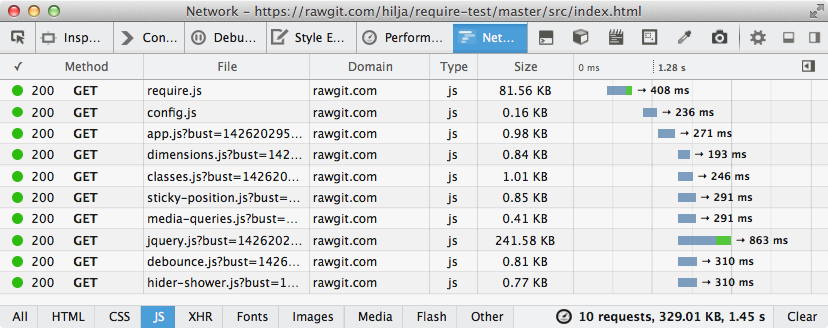
Pop open dev tools and have look at the network tab. There's quite a buzz, that
can be reduced to just two files with the optimizer.
There’s the `build.js` file in `src/js` with the following content:
```js
;({
// If you got a main config file, this is the palce for it
mainConfigFile: 'config.js',
// Relative to this file's location
baseUrl: '.',
// The module name, this uses only a single file,
// there can be multiple different outputs also
name: 'config',
// The destination directory
out: '../../dist/js/global.js',
// If set to true, any files that were combined into a
// build bundle will be removed from the output folder.
removeCombined: true,
// Finds require() dependencies inside a require() or define call. By default
// this value is false, because those resources should be considered dynamic/runtime
// calls. However, for some optimization scenarios, it is desirable to
// include them in the build.
findNestedDependencies: true,
// For test purposes, the output is not minified.
// In the real world this would be set to uglify, uglify2, or to closure
optimize: 'none',
})
```
There are tons of more option, see all of them explained
[here](https://github.com/jrburke/r.js/blob/master/build/example.build.js).
Then, run the `r.js` command from the command line:
```shell
$ r.js -o src/js/build.js
Tracing dependencies for: config
/Users/name/code/require-build-test/dist/js/global.js
----------------
/Users/name/code/require-build-test/src/lib/jquery.js
/Users/name/code/require-build-test/src/js/modules/dimensions.js
/Users/name/code/require-build-test/src/js/modules/classes.js
/Users/name/code/require-build-test/src/js/modules/sticky-position.js
/Users/name/code/require-build-test/src/js/modules/media-queries.js
/Users/name/code/require-build-test/src/js/modules/debounce.js
/Users/name/code/require-build-test/src/js/modules/hider-shower.js
/Users/name/code/require-build-test/src/js/modules/app.js
/Users/name/code/require-build-test/src/js/config.js
```
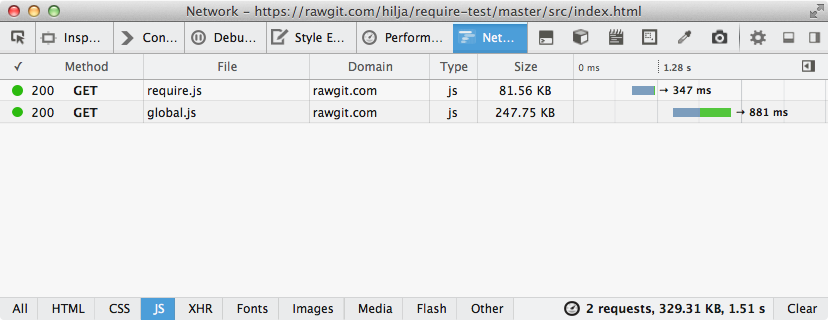
This will yield `dist/js/global.js` file with all the modules in it. Next, the
`global.js` needs to be used instead of the modules:
```html
```
Now the network tab is much less busy:
## Automate it with Gulp
[gulp-shell](https://www.npmjs.com/package/gulp-shell) can run command line
commands from Gulp.
Install:
```bash
$ npm install --save-dev gulp-shell
```
Simple task definition in Gulpfile:
```js
var gulp = require('gulp')
var shell = require('gulp-shell')
// Run the r.js command, such a simple task :)
gulp.task(
'scripts',
shell.task([
// This is the command
'r.js -o build/r/build.js',
])
)
```
Then add it to your default task:
```js
gulp.task('build', ['concat', 'sass', 'cssopt', 'images', 'scripts'])
```
Or run as as it is `$ gulp scripts`. For me it took around 2.2s to run, so it's
not wise to put in watch, it makes developing a bit too much like walking tar.
## Dealing with the overhead
All this niceness doesn't come for free, **RequireJS creates a bit of overhead,
even after the code optimisation, the module definitions are still in your
files**. And of course the RequireJS library needs to be loaded, it's 17kb as
minified and **6kb in minified and gzipped**. You can care of this or not, I
don't, really, for now at least. But if you do, there are ways to deal with
that.
### AMD Clean
[AMD clean](https://github.com/gfranko/amdclean) is helpful tool that turns your
requireJS flavoured code to plain JavaScript. Then just load it like any old JS
file. In this way, RequireJS can be used only as a development tool to organise
code, and if the project happens to grows larger, the needed infrastructure is
already there to accommodate larger volumes of code. I'm planning a post on this
also.
### Almond
Almond is somewhat like a lite version of RequireJS.
> A replacement AMD loader for RequireJS. It provides a minimal AMD API
> footprint that includes loader plugin support. Only useful for built/bundled
> AMD modules, does not do dynamic loading.
See more in the [Git repo](https://github.com/jrburke/almond).
## Conclusions
RequireJS is a weird combination of a development tool and a front end script
loader. At first it might be hard to see what's the benefit, but after using it
a while it's hard to go back.
There will be a third part of these articles also, it's will delve deeper to the
optimisation topics.