This post shows how to redirect command output or static text to a file.
The redirection operators > and >>
Write a string to a file, replacing its contents:
$ echo "hello" > foo.txtUse >> to append instead:
$ echo "hello" >> foo.txtAppend command output into a file:
$ ls >> foo.txtUse cat to check the result:
$ cat foo.txtA real-world example is adding fish to your available shells:
$ command -v fish | sudo tee -a /etc/shellsThe tee command
You can also pipe into the tee command:
$ command -v fish | tee foo.txtUse the -a flag to append:
$ command -v fish | tee -a foo.txtThe paste command
This command outputs filenames separated by commas:
$ ls -1 | paste -sd "," -
foo.txt,bar.txt,baz.txt
It breaks down to:
-1(The numeric digit one.) Force output to be one entry per line. This is the default when output is not to a terminal.
-sConcatenate all of the lines of each separate input file in command line order. The newline character of every line except the last line in each input file is replaced with the tab character, unless otherwise specified by the -d option.
-dUse one or more of the provided characters to replace the newline characters instead of the default tab.
-- The hyphen at the end means standard input.
To keep one filename per line, skip paste:
$ ls -1 > foo.txtIf you want to limit the results, globs can be used in normal fashion. This lists only jpg files:
$ ls -1 *.jpg | paste -sd "," - > jpegs.txtOr jpgs and pngs:
$ ls -1 *.{jpg,png} | paste -sd "," - > bitmaps.txtMake a CSV
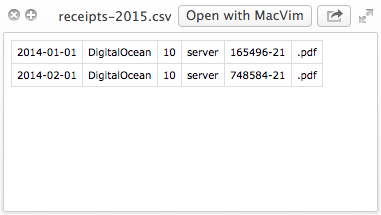
A primitive receipt management system. Name your receipts in this format:
yyyy-mm-dd,recipient,price,item,reference,.extAn example file might look like this:
2015-01-01,DigitalOcean,10,server,165496-21,.pdfThen print them out into a file:
$ ls -1 *.pdf > receipts-2015.csvThen open it in a spreadsheet application.