A short an sweet guide into optional chaining operator in JavaScript.
Which problem optional chaining addresses?
You can go one level deep in an object without getting an error:
const foo = {}
console.log(foo.bar) // undefined 👍
But not more:
console.log(foo.bar.baz)
// ❌ Uncaught TypeError: Cannot read properties of undefined
Same with a deeper object and null values:
const foo = { bar: { baz: null } }
console.log(foo.bar.baz.quix)
// ❌ Uncaught TypeError: Cannot read properties of null
Before optional chaining you would’ve maybe used Lodash get() or such:
import _ from 'lodash'
console.log(_.get(foo, 'bar.baz.quix'))
Optional chaining operator
This is when we can use the ?. syntax:
console.log(foo.bar.baz.quix?.zot) // undefinedNow it returns undefined and your program won't crash.
Optional chaining with functions
It also works with functions methods:
const string: string | undefined = undefined
console.log(string?.trim())
Or you can test if a method exists, like a callback function etc:
const someFunctions = (foo: string, callbackFn?: () => void) => {
  // Do something...
  return callbackFn?.()
}

// Now it doesn’t error if called without the callback fn
someFunction('Foo bar')
With bracket notation
It also works when getting object values using the bracket notation:
let foo = {
  bar: null,
}
let key = 'baz'

console.log(foo.bar?.[key]) // undefined
Or array index, this doesn’t do much, because calling an index that doesn’t exist doesn’t error out. Nonetheless, it’s works:
let foo = [1, 2, 3]
console.log(foo?.[3]) // undefined
Conclusions
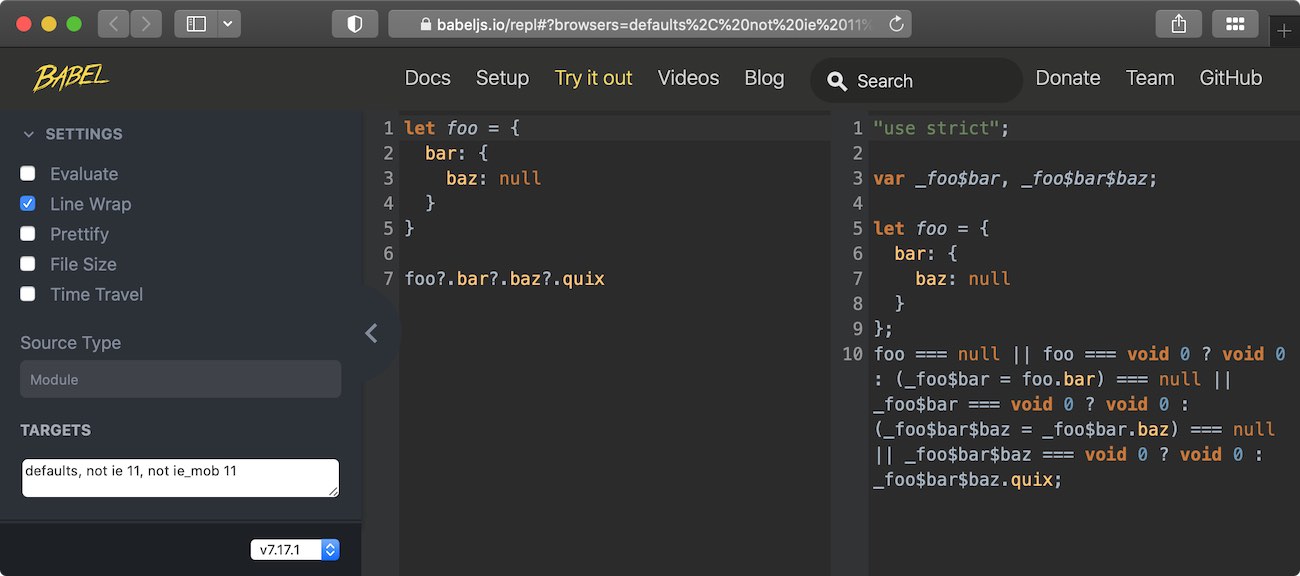
One thing to keep in mind is that extensive usage of the optional chaining operator might add some weight to your bundles. Below is a screenshot from Babel compiler, where you can see that the transpiled code is much larger than the original.
I’d avoid using the optional chaining operator if not needed, for example in
this case, only the last ?. is needed. For the related operators that handle
missing values, see
the guide to JavaScript's logical and nullish operators.