This post looks into hyphenation with pure CSS.
Hyphenation is more common in print than on the web, but sometimes it comes in handy if dealing with long words in tight spaces like sidebars etc. Also some language, like German, have long compound words that can easily break a layout, too bad most browsers support hyphenation only in English.
Define site’s language
First things first, you need to set lang="en" attribute to the parent
element, usually in the html tag, or hyphenation simply won't work:
<html lang="en"></html>In some React systems you can do that by using a react-helmet:
<Helmet htmlAttributes={{ lang: 'en' }} />Hyphenation
The CSS rule to make hyphenation happen is hyphens, the value can be set to
auto, manual, or none (see manual usage below).
Here’s an example how that might look like:
.hyphenated-text {
  hyphens: auto;
}
Extraordinarily long words like internationalization or accessibility
📷 See screen capture rendered with Chromium
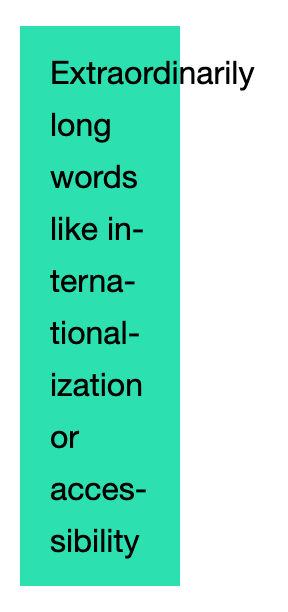
For some reason in Chromium based browsers "Extraordinarily" is not hyphenated because... I have no idea.
You often see hyphens coupled with word-break and word-wrap, here’s how
that looks like:
.hyphenated-text {
  hyphens: auto;
  word-break: break-word;
  word-wrap: break-word;
}
Extraordinarily long words like internationalization or accessibility
📷 See screen capture rendered with Chromium
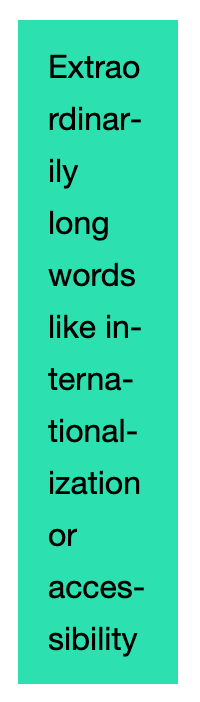
You can see "Extraordinarily" is chopped up to prevent overflow, and now it also has a hyphen. I guess that’s how the hyphenation algorithm works.
Manual hyphenation
You can give the hyphenation algo some hints where to add the hyphen by using
the ­ (soft hyphen) character. If you set hyphens: manual it will only
add hyphens where ­ is is used.
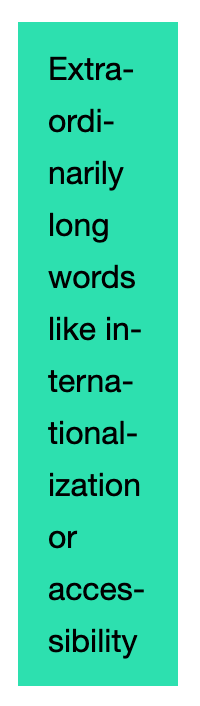
Below is a demo of hyphens: auto with a string containing a soft hyphen
Extra­ordinarily:
Extraordinarily long words like internationalization or accessibility
📷 See screen capture rendered with Chromium
Browser support
See browser support at caniuse.com, or this big compat table at MDN. You’ll see that only Firefox has wide support for hyphenation in other languages than English.
Vendor prefixes
Hyphenation is often set with vendor prefixes, but in the modern era they’re not really needed, unless you want to support IE11. But here they are:
.hyphenated-text {
  hyphens: auto;
  -moz-hyphens: auto;
  -webkit-hyphens: auto;
  word-break: break-word;
  -ms-word-break: break-all;
  word-wrap: break-word;
}