# How to handle icons React: as components
What are the best ways to handle SVG icons in a modern React project, and how to
effortlessly minify large quantities of icons.
For a deliberately manual sprite setup, see
[the low-tech React icon system](/lowteck-icons).
## Roughly plotted timeline of icons on the web
**Img:** the easiest way to an icons just an img tag: ``,
but that’s one HTTP request per icon, and since a big share of the page load
time is latency, it matters. Also, 2x screens need a 2x asset.
**Bitmap sprites:** then we collectively figured out to do image sprites: put
all the icons into one big image and load that once, then using some
CSS-background-smartness, show only the needed bit. Fidgety as hell.
**Icon fonts:** turns out an icon could just be glyph in font and it only uses
one HTTP call. That was brilliant, in a way, but it always felt kind of hacky;
the sizing was weird and dealing with line-heights and all that was a pain.
**SVGs and SVG sprites:** then we properly figured out the SVG images, which
scale to your hearts content not matter what screen density you’re on, and SVGs
could be inlined. And soon after the SVG sprite technology started to get more
popular, and the browser support grew. This actually solved the fidgetiness
issue of sprites by providing a real, properly designed, mechanism to request a
given portion of the sprite. This felt good, an actual solution to a problem
with no major downsides! SVG sprite is the best way of handling an icon set on a
non-React project.
**The singularity:** everything’s a React component and JavaScript is the only
programming language we use. The best and the most endorphin inducing way of
doing icons is just to think of them as React components. No new technology to
learn, no libs to load, a problem solved just as a collateral effect of React.
## How to use Icons as React components
I’ll be using this right-pointing arrow icon as an example:
[Interactive example](/how-to-do-icons-in-react)
The raw SVG of that arrow:
```xml
```
We can turn it into a React component super easily, the SVG also contains a
bunch of fluff that can be removed:
```tsx
import { ComponentProps } from 'react'
export const ArrowRight = (props: ComponentProps<'svg'>) => (
)
```
Here’s the explanation for the removed SVG attributes:
- The `version` attribute is not needed, it’s ballast and will be removed in the
SVG 2.0 spec.
- The `xmlns` attribute is not needed in inline SVGs.
- The `xmlns:xlink` attribute is likewise not needed when inlining SVG.
- The `width` attribute is removed because props are spread, choose the width
when using the icon, or define it in the icon styles.
- `height` ditto.
But what about that `d` and `fill` attributes, how are they so different? Glad
you asked.
## Automatically turn SVGs into React components with SVGR
There’s a great [SVG tool called SVGR](https://react-svgr.com/) (the R stands
for React), which turns SVGs into React components, minifying them in the
process using [SVGO](https://github.com/svg/svgo), and formatting with prettier.
Below a quick rundown on how to use it.
### SVGR Command line interface usage
You can use npx to quickly run it from your prompt, without installing anything:
```shell
npx @svgr/cli \
--no-dimensions \
--expand-props \
--replace-attr-values "#000000=currentColor" \
arrow-right.svg
```
--no-dimensions
Remove width and height from root SVG tag.
--expand-props
All properties given to component will be forwarded on SVG tag. Possible
values: "start", "end" or false ("none" in CLI). Meaning the props are
spread into the svg component: ``.
--replace-attr-values
This `"#000000=currentColor"` replaces `#000000` with
`currentColor` so the SVG inherits text color. It’s possible to
do multiple values: `#000=currentColor,#fff=currentColor`. This
can also be done in CSS: `fill: currentcolor;`.
All of the
[option are available in the SVGR docs](https://react-svgr.com/docs/options/).
Process a whole directory of icons:
```shell
npx @svgr/cli -d my-svgs --ignore-existing my-icon-components
```
-d
Tells the script we’re dealing with a directory.
--ignore-existing
Does not override already existing files in the target dir.
### SVGR WebPack usage
Install the WebPack extension of SVGR:
```shell
npm install @svgr/webpack --save-dev
```
Configuration to be placed in `webpack.config.js`, see all
[options in the SVGR docs](https://react-svgr.com/docs/options/):
```js
{
test: /\.svg$/,
use: ['@svgr/webpack'],
options: {
dimensions: false,
expandProps: 'start'
}
}
```
Then use the React component in your code:
```tsx
import ArrowRight from './icons/arrow-right.svg'
const App = () => (
)
```
### SVGR Node usage
When using the Node API the plugins are not included by default, they have to be
defined in the options. Something like this:
```ts
import { readFileSync } from 'node:fs'
import svgr from '@svgr/core'
const svgIcon = fs.readFileSync('./icons/arrow-right.svg')
const options = {
dimensions: false,
plugins: ['@svgr/plugin-svgo', '@svgr/plugin-jsx', '@svgr/plugin-prettier'],
}
const icon = await svgr(svgIcon, options, { componentName: 'ArrowRight' })
writeFileSync('ArrowRight.js', icon)
```
### Manual usage
Honestly, I’ve never used SVGR programmatically, until I wrote the above
examples. Because I’ve never needed to churn out icons in such volume, that it
would be beneficial to script that. I usually make the React components manually
if I’m dealing with already minified SVGs, or
[I've used extremely helpful SVGR GUI](https://react-svgr.com/playground/).
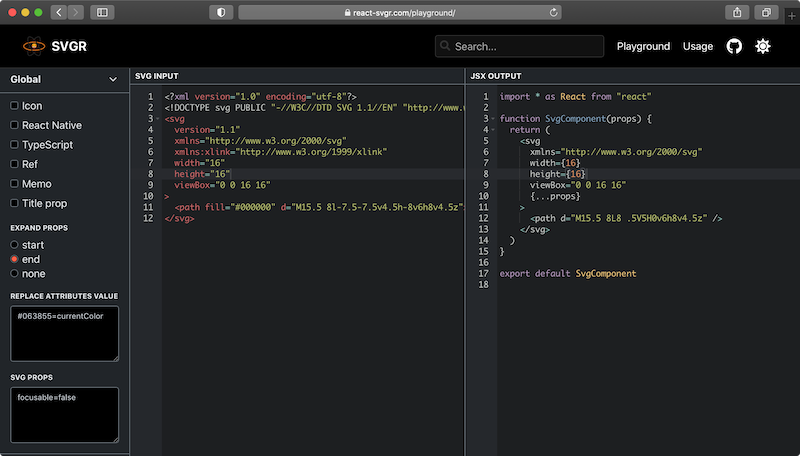
The SVGR playground
## Where to find free SVG icons?
For the longest time I’ve been using IcoMoon’s
[free icon pack](https://icomoon.io/#preview-free), they’re good for utility
icons like arrows or social media logos etc. The SVGs can be
[copied from their GitHub](https://github.com/Keyamoon/IcoMoon-Free/tree/master/SVG).
Also their [Lindua icon pack](https://icomoon.io/#icons-lindua) is super crisp,
it’s more for the situations when you want more illustrative feel from the
icons. It’s $69, but I think it’s worth the money.
Other places to find free icons:
[feathericons.com](https://feathericons.com/)
This site has a small set of open source icons, you don’t need to login to
download the icons.
[remixicon.com](https://https://remixicon.com/)
Also a small-ish, set of free icons. The site has a "Copy SVG" button, which
is brilliant, just paste the SVG straight into the React component. It also
gives the icons as a data URLs, not bad.
[icons.getbootstrap.com](https://icons.getbootstrap.com/)
The Bootstrap project has a 1,200 strong open source icon set. The site
allows you to copy the icons from the page as SVG. Or you can also install
the icon set `npm i bootstrap-icons` to your system.
[Super Tiny Icons](https://github.com/edent/SuperTinyIcons)
Absolutely the best collection of brand icons. Super Tiny Icons prices
itself of the very highly optimized icons, hence it’s name. For example the
Twitter icon weighing only 414 Bytes, Facebook icon is cruises at 311 Bytes.
[svgrepo.com](https://www.svgrepo.com/)
This site has a bewildering 300,000 icons selection. The icons can be
downloaded straight. But with such a vast back catalogue, consistency is all
over the place.
## Conclusions
Icons as React components, and SVG sprites; that’s the sharpest edge of icon
handling right now I think.
This post is not so much about using icons, but more about **how to make
icons**. A correct usage of an icon comes with important accessibility
requirements, and I’ve got a post on
[how to write a accessible and modern icon component](/accessible-and-modern-react-icon-component).
Have a look if you’re interested.
 `,
but that’s one HTTP request per icon, and since a big share of the page load
time is latency, it matters. Also, 2x screens need a 2x asset.
**Bitmap sprites:** then we collectively figured out to do image sprites: put
all the icons into one big image and load that once, then using some
CSS-background-smartness, show only the needed bit. Fidgety as hell.
**Icon fonts:** turns out an icon could just be glyph in font and it only uses
one HTTP call. That was brilliant, in a way, but it always felt kind of hacky;
the sizing was weird and dealing with line-heights and all that was a pain.
**SVGs and SVG sprites:** then we properly figured out the SVG images, which
scale to your hearts content not matter what screen density you’re on, and SVGs
could be inlined. And soon after the SVG sprite technology started to get more
popular, and the browser support grew. This actually solved the fidgetiness
issue of sprites by providing a real, properly designed, mechanism to request a
given portion of the sprite. This felt good, an actual solution to a problem
with no major downsides! SVG sprite is the best way of handling an icon set on a
non-React project.
**The singularity:** everything’s a React component and JavaScript is the only
programming language we use. The best and the most endorphin inducing way of
doing icons is just to think of them as React components. No new technology to
learn, no libs to load, a problem solved just as a collateral effect of React.
## How to use Icons as React components
I’ll be using this right-pointing arrow icon as an example:
[Interactive example](/how-to-do-icons-in-react)
The raw SVG of that arrow:
```xml
```
We can turn it into a React component super easily, the SVG also contains a
bunch of fluff that can be removed:
```tsx
import { ComponentProps } from 'react'
export const ArrowRight = (props: ComponentProps<'svg'>) => (
)
```
Here’s the explanation for the removed SVG attributes:
- The `version` attribute is not needed, it’s ballast and will be removed in the
SVG 2.0 spec.
- The `xmlns` attribute is not needed in inline SVGs.
- The `xmlns:xlink` attribute is likewise not needed when inlining SVG.
- The `width` attribute is removed because props are spread, choose the width
when using the icon, or define it in the icon styles.
- `height` ditto.
But what about that `d` and `fill` attributes, how are they so different? Glad
you asked.
## Automatically turn SVGs into React components with SVGR
There’s a great [SVG tool called SVGR](https://react-svgr.com/) (the R stands
for React), which turns SVGs into React components, minifying them in the
process using [SVGO](https://github.com/svg/svgo), and formatting with prettier.
Below a quick rundown on how to use it.
### SVGR Command line interface usage
You can use npx to quickly run it from your prompt, without installing anything:
```shell
npx @svgr/cli \
--no-dimensions \
--expand-props \
--replace-attr-values "#000000=currentColor" \
arrow-right.svg
```
--no-dimensions
Remove width and height from root SVG tag.
--expand-props
All properties given to component will be forwarded on SVG tag. Possible
values: "start", "end" or false ("none" in CLI). Meaning the props are
spread into the svg component: ``.
--replace-attr-values
This `"#000000=currentColor"` replaces `#000000` with
`currentColor` so the SVG inherits text color. It’s possible to
do multiple values: `#000=currentColor,#fff=currentColor`. This
can also be done in CSS: `fill: currentcolor;`.
All of the
[option are available in the SVGR docs](https://react-svgr.com/docs/options/).
Process a whole directory of icons:
```shell
npx @svgr/cli -d my-svgs --ignore-existing my-icon-components
```
-d
Tells the script we’re dealing with a directory.
--ignore-existing
Does not override already existing files in the target dir.
### SVGR WebPack usage
Install the WebPack extension of SVGR:
```shell
npm install @svgr/webpack --save-dev
```
Configuration to be placed in `webpack.config.js`, see all
[options in the SVGR docs](https://react-svgr.com/docs/options/):
```js
{
test: /\.svg$/,
use: ['@svgr/webpack'],
options: {
dimensions: false,
expandProps: 'start'
}
}
```
Then use the React component in your code:
```tsx
import ArrowRight from './icons/arrow-right.svg'
const App = () => (
`,
but that’s one HTTP request per icon, and since a big share of the page load
time is latency, it matters. Also, 2x screens need a 2x asset.
**Bitmap sprites:** then we collectively figured out to do image sprites: put
all the icons into one big image and load that once, then using some
CSS-background-smartness, show only the needed bit. Fidgety as hell.
**Icon fonts:** turns out an icon could just be glyph in font and it only uses
one HTTP call. That was brilliant, in a way, but it always felt kind of hacky;
the sizing was weird and dealing with line-heights and all that was a pain.
**SVGs and SVG sprites:** then we properly figured out the SVG images, which
scale to your hearts content not matter what screen density you’re on, and SVGs
could be inlined. And soon after the SVG sprite technology started to get more
popular, and the browser support grew. This actually solved the fidgetiness
issue of sprites by providing a real, properly designed, mechanism to request a
given portion of the sprite. This felt good, an actual solution to a problem
with no major downsides! SVG sprite is the best way of handling an icon set on a
non-React project.
**The singularity:** everything’s a React component and JavaScript is the only
programming language we use. The best and the most endorphin inducing way of
doing icons is just to think of them as React components. No new technology to
learn, no libs to load, a problem solved just as a collateral effect of React.
## How to use Icons as React components
I’ll be using this right-pointing arrow icon as an example:
[Interactive example](/how-to-do-icons-in-react)
The raw SVG of that arrow:
```xml
```
We can turn it into a React component super easily, the SVG also contains a
bunch of fluff that can be removed:
```tsx
import { ComponentProps } from 'react'
export const ArrowRight = (props: ComponentProps<'svg'>) => (
)
```
Here’s the explanation for the removed SVG attributes:
- The `version` attribute is not needed, it’s ballast and will be removed in the
SVG 2.0 spec.
- The `xmlns` attribute is not needed in inline SVGs.
- The `xmlns:xlink` attribute is likewise not needed when inlining SVG.
- The `width` attribute is removed because props are spread, choose the width
when using the icon, or define it in the icon styles.
- `height` ditto.
But what about that `d` and `fill` attributes, how are they so different? Glad
you asked.
## Automatically turn SVGs into React components with SVGR
There’s a great [SVG tool called SVGR](https://react-svgr.com/) (the R stands
for React), which turns SVGs into React components, minifying them in the
process using [SVGO](https://github.com/svg/svgo), and formatting with prettier.
Below a quick rundown on how to use it.
### SVGR Command line interface usage
You can use npx to quickly run it from your prompt, without installing anything:
```shell
npx @svgr/cli \
--no-dimensions \
--expand-props \
--replace-attr-values "#000000=currentColor" \
arrow-right.svg
```
--no-dimensions
Remove width and height from root SVG tag.
--expand-props
All properties given to component will be forwarded on SVG tag. Possible
values: "start", "end" or false ("none" in CLI). Meaning the props are
spread into the svg component: ``.
--replace-attr-values
This `"#000000=currentColor"` replaces `#000000` with
`currentColor` so the SVG inherits text color. It’s possible to
do multiple values: `#000=currentColor,#fff=currentColor`. This
can also be done in CSS: `fill: currentcolor;`.
All of the
[option are available in the SVGR docs](https://react-svgr.com/docs/options/).
Process a whole directory of icons:
```shell
npx @svgr/cli -d my-svgs --ignore-existing my-icon-components
```
-d
Tells the script we’re dealing with a directory.
--ignore-existing
Does not override already existing files in the target dir.
### SVGR WebPack usage
Install the WebPack extension of SVGR:
```shell
npm install @svgr/webpack --save-dev
```
Configuration to be placed in `webpack.config.js`, see all
[options in the SVGR docs](https://react-svgr.com/docs/options/):
```js
{
test: /\.svg$/,
use: ['@svgr/webpack'],
options: {
dimensions: false,
expandProps: 'start'
}
}
```
Then use the React component in your code:
```tsx
import ArrowRight from './icons/arrow-right.svg'
const App = () => (