Four different ways to create an HTML element in jQuery.
Method #1, the obvious method
The following may be enough much of the time:
var el = '<a href="http://example.com" class="link" id="link2">Testing</a>'I sense that it is not really recommended by the community. There are better things.
Method #2, the better method
var $el = $('<a>')
  .addCLass('link')
  .attr('href', 'http://example.com')
  .attr('id', 'link2')
  .text('Testing')
Or, same thing but just easier to read:
var $el = $('<a>')
  .addCLass('link')
  .attr('href', 'http://example.com')
  .attr('id', 'link2')
  .text('Testing')
Method #3, the also very nice method
This was added in jQuery 1.4.
var $el = $('<a/>', {
  id: 'link2',
  class: 'link',
  href: 'http://example.com',
  title: 'This is a test',
  rel: 'external',
  text: 'Testing',
})
Method #4, the fastest method
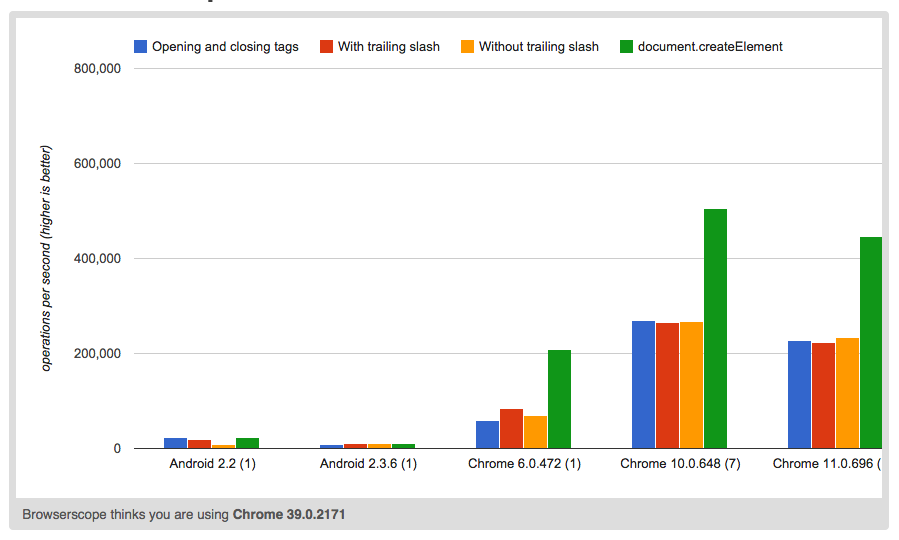
This resonates positively in my programmer monkey brain. According to JsPerf the following method is also the fastest (if that's important to you).
var $e = $(document.createElement('div'))

$e.addClass('foo module')
  .attr('name', 'bob')
  .text('This div is created with jQuery and inserted here.')
  .insertAfter('#module')
Scorecard
document.createElement is clearly fastest of these methods. Here's a JsPerf
scorecard:
Demo
A little demo never hurt anybody. Here is method #4 in action.