Adding an element after or before another element in the DOM is called appending or prepending. Pure JavaScript provides some handy methods for both.
If you’ve used jQuery, you may know the append() and prepend() methods.
Here’s how to do the same with native JavaScript.
Appending elements with appendChild
The appendChild method will put the source element inside the target element,
in the last position, after all of the pre-existing elements.
The below example will:
- Get an existing element,
#box - Create a new element and store it into a variable
jack - Give the new element some content
- Put
jackin#box
const box = document.getElementById('box')
const jack = document.createElement('div')
jack.innerHTML = 'Jack!'
box.appendChild(jack)
That would give us the following HTML:
<div id="box">
  <p>Lorem ipsum...</p>
  <div>Jack!</div>
</div>
There’s a rule: the same node can’t be present twice in the DOM, this means
that if an existing element is appended, it will be removed from its original
position. So in that case it’s more like a move command. If this is not desired,
try the
.cloneNode()
instead.
Prepend with insertBefore
There’s no prependChild, but prepending can be done using insertBefore().
The steps are the same as above, except for the last line. You need to give
insertBefore 3 things:
- The target element to insert:
box - What to insert:
jack - Before which element to insert:
element.firstChild
const box = document.getElementById('box')
const jack = document.createElement('div')
jack.innerHTML = 'Jack!'
box.insertBefore(jack, box.firstChild)
Demo
Performance compared to jQuery
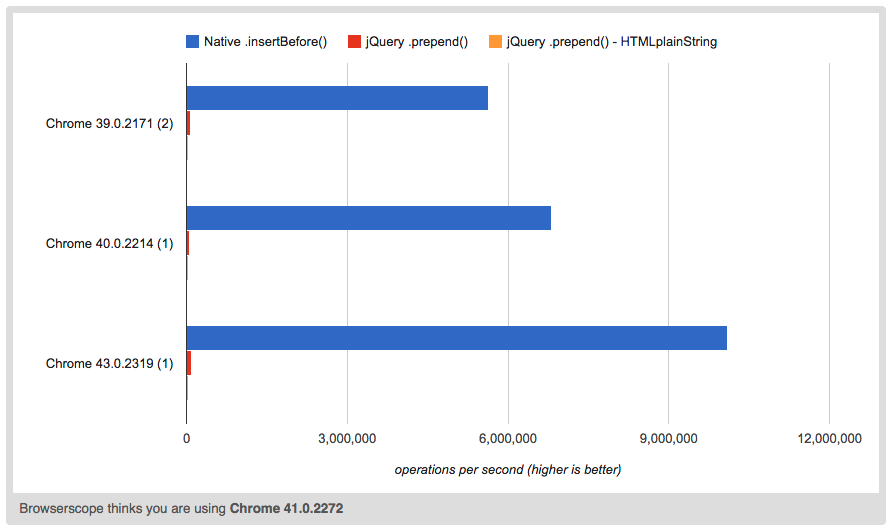
Performance is of course completely unimportant, unless you deal with millions
of iterations. But anyway, the native methods are much faster than jQuery
.append().
The higher the bar, the faster the method:
Conclusions
Both of these methods are pretty solid and they work in all browsers.